

I have to tell you up-front that I do not own a Fellowes Office Suites Laptop Riser Plus but I work with a bunch of people who do. You see, I have a docking station for my laptop and have a large 17” monitor that I use in conjunction with the docking station. I tried to use two monitors but I found it difficult to manage so I ended up sticking to one monitor.
My co-workers who use the laptop riser also have docking stations but, since they got the riser, they are using the laptop screen as a second monitor in a dual-monitor setup. Until they got the laptop riser, the actual screen was at a much lower level than their other monitor.
Ever since they were able to increase the height of the laptop screen with the riser, they have been able to easily utilize the two monitor office scenario without the company having to purchase a second monitor for their offices.
Laptop Riser Images in my Office Cubicle
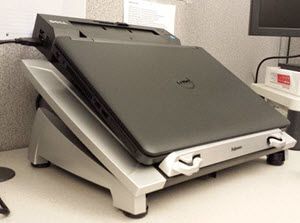
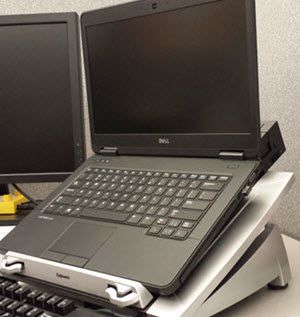
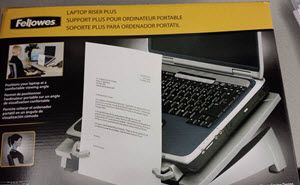
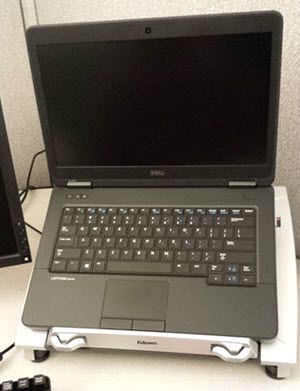

As you can see from the image above, you can easily raise the eye level of your laptop screen so as to prevent neck strain. The fact that the screen can be raised is the big comment and best feature according to my co-workers.
Note how the screen of the monitor is raised significantly which makes it ergonomically perfect for data entry and viewing the screen at eye level. Note how it is equal in height to their other monitor.
Note the cooling vents in the riser plus in the image on the right. This helps dissipate heat emanating from the laptop which is a smart feature.
The docking station is seen above but you don’t need a docking station with the laptop riser plus.
As you can see from the above images, it is a really unique office or cubicle accessory. Before I saw them in the offices around me, I had never heard of this accessory which is kind of like my Note Rail and my Cubicle Utility Bowl. Without the help of my readers, I would’ve never purchased these cubicle accessories.
Fellowes Office Suites Laptop Riser Plus Features
- Product Dimensions: 15.3 x 11.9 x 5.3“ ; 2.6 pounds
- Raises the screen of your laptop to eye-level reducing neck strain.
- Cooling vents dissipate heat from the laptop.
- Ergonomically-sound keyboard angle for data entry.
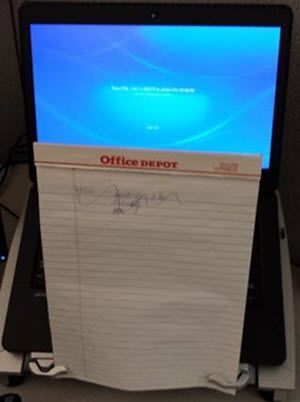
- Added feature of holding a notepad, list, or letter upright.
- Supports a 17” laptop with a maximum weight of 10 lbs.
- 360° rotation allows for easy viewing and cord accessibility.

This Fellowes Office Suites Laptop Riser Plus appears to be a big hit with my co-workers. If you have a laptop at work that you use on a regular basis, you might want to look into this rather novel and useful computer accessory.
It may cut down on any neck strain that you could currently be experiencing with your current environment and the angled keyboard may also be a big benefit ergonomically as well. I’ve asked around in my office and the people who are currently utilizing this product are happy customers.

Bob writes about office decor and tips and home decor room by room, from accent walls and kitchens to bathrooms and living rooms. He and his wife are constantly renovating their own home in a rustic setting, and a lot of his articles start with a project they’ve actually done—like the cedar accent wall in their bathroom or the black kitchen cabinets. Every photo is a real room, never an AI-generated fake.
He’s been blogging for over 20 years. He started as an office and cubicle writer, launching CubicleBliss in January 2011 and rebranding it as WorkspaceBliss in April 2020 before growing it into the whole home. That office background runs deep: 35+ years as an IT Manager, Applications Engineer, Systems Analyst, and Programmer Analyst, a Certified Microsoft Professional with a Master’s and two Bachelor’s degrees. He’s been featured in US News and World Report, Bustle, and Work Awesome (his articles here).